
The Mercury® DK1 and DK1E lighting control kits present an ideal ‘out-of-the-box’ opportunity for electrical installers to exploit the growing trend towards a smarter home.
Touch here to get started
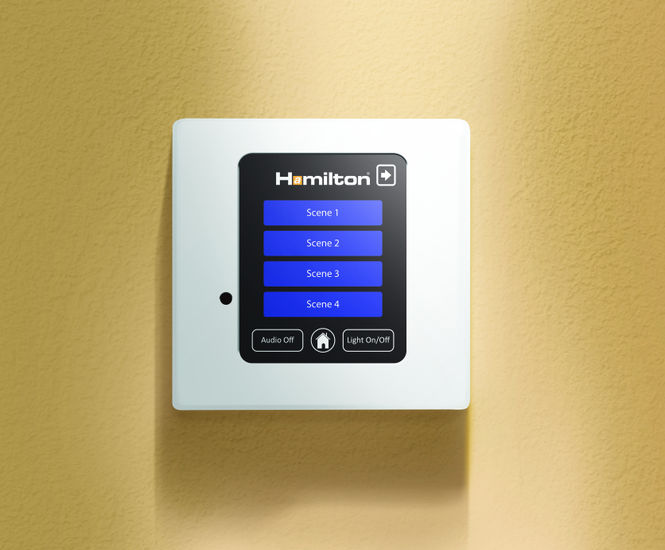
Described as entry-level systems, both the DK1 and the DK1E kits contain everything needed to control one lighting circuit with the now standard ‘Touch Screen’ control plate. The DK1 kit is controlled using a wired touch screen plate, and the DK1E has built-in Ethernet and enables wireless control via iPad and iPhone using Hamilton’s downloadable App, available on the App Store.
Taking the first step to a smart home just got easier
The customer benefits of installing a smart lighting control system are compelling: controlling ambiance and mood light levels at the touch of a button to enhance carefully planned living space; satisfying the insatiable appetite to remotely control all aspects of our homes/lives via an app, and of course the possible significant energy savings makes lighting control a natural choice.
Setting the scene
Everything about this smart lighting control solution just looks and feels right: simplicity is at the forefront of its design making it easy to install. Basic day-to-day lighting scenarios, from simple dimming to scene-setting programmes, can be set, stored and recalled – all at the touch of a button.
Start small and think big
The encased dimmer hub is straightforward to access and wire-in and for simple 4-channel applications can work ‘Out of the box’. For projects that require more circuits, say in a kitchen, lounge and dining room, the dimmer packs can be linked together and configured using simple dip switch settings - no programming is required.
The finishing touch
Customers will love controlling their lighting via the touch screen controller, which comes in a white plastic plate finish as standard but can be upgraded at no extra cost to a metal finish from Hamilton’s Hartland CFX® or Sheer CFX® collections. The system can also be controlled by a handheld infra-red remote control.
Easy to set and store scenes with the touch of a button
When installing the Touch Screen controller, absolutely no commissioning work is required as the unit is pre-loaded with the necessary software. The process of setting the light scenes is not dissimilar to programming a car radio - simply hold your finger on the icon button until it locks in.